# Guides

# Basics of A Path Above

Here are the fundamentals of how to get started on APA

# Sanctuary Community Rules

#### **Community Rules for Sanctuary:**

These rules only apply to Sanctuary and anything within its walls. If there are breaches of these rules, the Admins will action any resolutions without notice. Repeated breaches may result in a revocation of Shop privileges or even a ban,

- No Placed items. 
    - "Placed" items are those that create a 3D model in game, it's these models that cause FPS issues in great numbers. Furniture and other sprite-based tiles are perfectly fine and are not affected by this rule.
    - Floor Wipes will always occur on a Friday (Afternoon US) as needed and without extra warning.
    - Any Placed items will be deleted in the Floor Wipes. No items will be restored.
    - Containers are safe and will not be affected, make sure all your items are in containers.
- You can make a sign on top of your shop plot.
- You can build interior walls to divide the shop up.
- You can change the exterior walls. 
    - Don't use more than a few window or glass tiles for performance reasons.
- You can change the walls between shops, check in with your neighbor first in case of decorations etc.
- You can add a delivery door at the rear of the shop if your shop has that possibility.

# Currency - What are MPC and Merits?

We have two main currencies on APA called MPCs and Merits.

### MPCs

MPCs (full name: Military Payment Certificates) are the most common currency and is easily found in multiple methods. MPCs are used for the most common everyday purchases, player stores typically operate using MPCs as their currency, and the transit system operates entirely on MPCs.

#### How do I earn MPCs?  


Here are the main ways to earn MPCs currently:

- Killing zombies in zones that reward MPCs (see Zones).
- Selling jewelry at the KSSA Sanctuary School ATM.

### Merits

Merits are a special currency awarded for completing typically higher difficulty objectives, such as operating in more dangerous zones or attending one of the events.

#### How do I earn Merits?

Here are the main ways to earn Merits currently:

- Killing zombies in zones that reward Merits (see Zones).
- Attending events that rewards Merits.

# Travel and the Bus System

So, you want to get to Sanctuary, or cross the map, and you don't have a vehicle and/or don't want to spend an eternity driving? Then have we got the solution for you! **Introducing: KSSA Transit** Now, you can take a bus (read: instantly teleport) from and to any of the bus stops around the map. You can easily get the bus by going to any of the stations and finding a KSSA Transit receiver, see image. Walk up to it, right-click and choose "APA Transit" to see your destinations. Currently, all destinations lead to Sanctuary, and from Sanctuary you can then travel back out to any of the stations. Travel costs 1 bus token. Tokens are given in the starter kit or can be bought at the KSSA ATM in Sanctuary. You can travel from Sanctuary to...

- Muldraugh
- West Point
- St. Bernard
- Riverside
- Rosewood
- Louisville
- Lake Cumberlland
- Eerie East
- Monmouth
- Trimble Camp
- Pineville

All travel to and from Sanctuary costs 1 bus token *These are the prices currently and are subject to change, inflation, and periodic zombie strikes.* **Important Note** When attempting to travel via the bus system, you won't be able to leave if there are zombies nearby to you. The KSSA Transit machine will warn you about how many zombies are too close and need clearing out. There is no such check for the destination! You may be dropped into a warm and bitey embrace.

[![image.png](https://wiki.apathabove.com/uploads/images/gallery/2024-12/scaled-1680-/ofGimage.png)](https://wiki.apathabove.com/uploads/images/gallery/2024-12/ofGimage.png)

# Tips to Survive

<sub> ...we don't know how to survive either, send help</sub>

# Knox Virus - Antibodies

TLDR Summary at the End.

#### *<span style="text-decoration: underline;">Understanding the Knox Virus on APA</span>*

The Knox Virus on APA is not a death sentence. it is possible to beat Knox via the functionality that Is introduced by the Antibodies mod. Transmission at this current moment (Season 9) is only possible by being on the receiving end of some zombie lovin. A bite will have a 100% chance of infection, Laceration 25%, and a Scratch 7%. It Is possible for someone who is level 10 first aid to view a panel with all the relevant information related to the virus.

[![image.png](https://wiki.apathabove.com/uploads/images/gallery/2024-12/scaled-1680-/37Uimage.png)](https://wiki.apathabove.com/uploads/images/gallery/2024-12/37Uimage.png)

#### *<span style="text-decoration: underline;">Virus and Antibody Progression</span>*

In the bottom left of the panel we have virus and antibody progression (%) followed by the virus and antibody **rate.** The moment you contract the virus you are given a virus rate which determines how fast the virus progression will be, NOTE: the virus rate is constant. The antibody rate is different from the virus rate in that it is not static and increases as your virus progresses, **peaking** at 50% virus progression, and tapering off thereafter. See theoretical plot of antibody rate as a function of virus progression.

[![image.png](https://wiki.apathabove.com/uploads/images/gallery/2024-12/scaled-1680-/n33image.png)](https://wiki.apathabove.com/uploads/images/gallery/2024-12/n33image.png)

[  ](https://wiki.apathabove.com/uploads/images/gallery/2024-12/Vzmimage.png)

#### *<span style="text-decoration: underline;">Beating the Virus</span>*

In order to beat the virus the antibody **progression** must reach the virus **progression** so that the stage reaches convalescence. In order for this to happen the antibody **rate** must surpass the virus **rate.** There are a number of penalties and benefits that affect the antibody rate aside from it's base value. I will talk about penalties here and then talk about benefits in a 'management' section.

##### *<span style="text-decoration: underline;">Penalties</span>*

- Bites apply a base -6 point penalty which can be seen in the Infection Effects tab.
- Bite wounds also apply a -6 point penalty but can be managed and even completely nullified in some cases with sterilized bandages. Can be seen in the Wound Effects tab
- Being over or under the ideal weight (75 - 85) also applies a penalty.
- Low endurance applies a penalty.
- Stress, and Unhappiness have a range of 0 to -5 penalty.
- Corpse Sickness applies a nasty penalty.
- Fitness and Strength can both Apply a penalty or a benefit depending on the level. They have a range of -5 to 5 so as an example, level 10 Fitness corresponds to a 5 point benefit.

#### *<span style="text-decoration: underline;">Heat Management</span>*

Generating heat is by far the most effective way to beat the virus. Heat applies a significant bonus to the antibody rate and scales based on how overheated you are. 95% of the players will tell you that the best strategy is to get as hot as possible as quick as possible.

- **Level 1 Overheat**: +6 resistance bonus (minimal effort required).
- **Level 4 Overheat**: +30.86 resistance bonus (maximum heat effectiveness).

To generate heat efficiently:

- **Avoid exercise**: Although exercise generates heat, it causes endurance loss, applying a penalty to antibody rate.
- **Clothing**: Pile on high insulation clothing on every free layer you can find.
- **Ovens/Fire:** Stand next to a fire or an oven, preferably indoors if it isn't summer.
- **Run/Swing:** Run into a wall or swing a heavy weapon to generate heat and increase your overheating level. Remember to rest after doing this to reduce the endurance penalty.

#### *<span style="text-decoration: underline;">Alcohol</span>*

Getting drunk is the next best option because it provides a considerable benefit to the antibody rate and there's no Alcoholic trait to be gained for drinking to much in Season 9. Alcohol is also an efficient way to manage your virus if you decide to opt out of beating the virus at home by a fire. You can also combine getting drunk with heat management for an even larger increase to antibody rate.

- **Max** **Drunkenness:** Provides a 10.86 point benefit to antibody rate.

The best method of obtaining Drunkenness per unit alcohol is to pour hard vanilla alcohol into Lowball glasses, For example, Bourbon. Each full lowball glass will provide a 2 level increase to drunk level.

#### <span style="text-decoration: underline;">*Wound Management*</span>

Bonuses to managing a wound are not consistent and can provide small negating effect up to a full negation of the -6 bite wound penalty. Regardless, it always makes sense to use a sterilized bandage and to keep a wound clean. Plantain Poultices will also increase the healing rate towards a wound.

[![image.png](https://wiki.apathabove.com/uploads/images/gallery/2024-12/scaled-1680-/MYjimage.png)](https://wiki.apathabove.com/uploads/images/gallery/2024-12/MYjimage.png)

# Death and Skill Recovery

Credit to @Blankey for this Guide.

The Bikini Skill Restore System is a unique way of obtaining a portion of your earned skill experience back after an 'untimely death'. Located all across Knox County are restore pods that allow you to insert a disk, which can be obtained automatically upon respawn or by right-clicking on a restore pod and choosing the 'interact with the pod' option, and obtain a set amount of experience back.

[![image.png](https://wiki.apathabove.com/uploads/images/gallery/2024-12/scaled-1680-/zJsimage.png)](https://wiki.apathabove.com/uploads/images/gallery/2024-12/zJsimage.png)

#####  

##### *<span style="text-decoration: underline;">How do I use the Skill Restore Pod?</span>*

Using the pods is very straightforward. Once you have your desired disk (*explained below*) in your inventory, right-click on the restore pod and choose 'Interact with the pod' &gt; 'Insert a personnel file' &gt; 'Personnel file "PLAYERNAME" 1234567890'. Upon choosing your file, it will disappear from your inventory and you'll slowly see your skills on the 'Skills' tab progress back up.

[![image.png](https://wiki.apathabove.com/uploads/images/gallery/2024-12/scaled-1680-/64cimage.png)](https://wiki.apathabove.com/uploads/images/gallery/2024-12/64cimage.png)

#####  

##### <span style="text-decoration: underline;">*Where to find the Skill Restore pod?* </span>

You can find a pod at each of the bus stations scattered across Knox County, one can also be located beside the school in Sanctuary. Pods are also identified by the following symbol on your map:

[![image.png](https://wiki.apathabove.com/uploads/images/gallery/2024-12/scaled-1680-/eU7image.png)](https://wiki.apathabove.com/uploads/images/gallery/2024-12/eU7image.png)

##### <span style="text-decoration: underline;">*What experience / skills get restored upon use?* </span>

Upon pod usage you'll recieve a varying level of experience depending on the specific skill. Restoring does just that, it restores. It brings back your former occupation, skills, knowledge (such as what you've learned through recipe books) and even your nutritional information such as weight and calorie count. NOTE: Professions/traits are locked to your build. If you wish to snowball from your initial build it is always recommended to respawn with a fresh 5str/5fit build with no traits and immediately restore your old build. Below is an example of a player with level 10 in all skills restoring at a pod.

[![image.png](https://wiki.apathabove.com/uploads/images/gallery/2024-12/scaled-1680-/RsYimage.png)](https://wiki.apathabove.com/uploads/images/gallery/2024-12/RsYimage.png)

##### <span style="text-decoration: underline;">*Where do I get a disk?* </span>

Disks can be obtained one of two ways:

- Dying and subsequently respawning. Upon respawning you'll find a personnel file with the stats from your previous life in your player inventory.
- Right-clicking on a pod and choosing 'Interact with the pod' &gt; 'Download a personnel file' &gt; 'Personnel file "PLAYERNAME" 1234567890'

If choosing the download method, you'll be met with numerous personnel files from your last 20 deaths. You can choose a file that wasn't your previous life if you had better stats.

[![image.png](https://wiki.apathabove.com/uploads/images/gallery/2024-12/scaled-1680-/f0kimage.png)](https://wiki.apathabove.com/uploads/images/gallery/2024-12/f0kimage.png)

Hovering over the Personnel file will show you what skills you had during that life and will give you a good understanding of what will be restored. It is best to always choose the file that has the most progress made on it. Professions/traits are locked to your build. If you wish to snowball from your initial build it is always recommended to respawn with a fresh 5str/5fit build with no traits and immediately restore your old build.

[![image.png](https://wiki.apathabove.com/uploads/images/gallery/2024-12/scaled-1680-/EAHimage.png)](https://wiki.apathabove.com/uploads/images/gallery/2024-12/EAHimage.png)

# Guns and Ammo


# Vehicles and the Claim System


# Safehouses

# This is your guide to all things safehouse related

<u>How many safehouses can I have?</u>

Each player can be an owner of one safehouse. You can be a member of any number of safehouses in addition to being the owner of one safehouse. *Important Note:* If you are the Owner of two safehouses at the same time, the Date Last Visited does not update, causing both safehouses to release regardless of your actions as a player. Do not be the Owner of more than one safehouse for any extended period of time.

<u>What Buildings are claimable?</u>

Any building that is "orange" on the map which stands for residential. If the building does not spawn any loot it can be considered for safehousing. Make a <span class="channelMention wrapper_bf1b19 interactive" role="link" tabindex="0"><span class="channelWithIcon iconMentionText_bf515c"><span class="name_bf515c">tickets</span></span></span> to discuss this with the admins. In Season 9 we introduced zones. Some zones restrict the ability to claim safehouses.

<u>Who can go in my safehouse?</u>

By default, only the Owner - the person who claimed the safehouse - has any access at all. Any other player will meet an invisible wall when attempting to walk inside the area and cannot interact with any containers or furniture items. On the left side of your screen is a "Client" button. Click that and go into Safehouse. From there, you can add and remove any players you like to your safehouse permissions as well as transfer ownership.

<u>How long do I keep a safehouse while offline?</u>

Claims last 14 days after your last active time. *Important Note:* To maintain a safehouse claim, the owner must log in and set foot inside the safehouse for the game to recognize and update the timer

<u>Can my safehouse be expanded?</u>

Yes. Players need to build walls around their desired single safehouse, purchase a land deed, and request the safehouse to be expanded. Off the grid houses can generally be larger than in city plots, feel free to get creative. All safehouse claims will be a rectangular area.

<u>Can I claim a safehouse in Sanctuary?</u>

Yes, see <span class="channelMention wrapper_bf1b19 interactive" role="link" tabindex="0"><span class="channelWithIcon"><span class="name_bf515c">sanctuary-hoa</span></span></span> for full details

<u>Can I make a custom claim zone or go build a house in the woods?</u>

Yes, you can make custom claim zones with the help of an admin. Open a ticket to discuss this before you start working to make sure you are making the most of your time.

# Player Shops and Stores

<p class="callout warning">**Make sure you read the [Sanctuary Community Rules](https://wiki.apathabove.com/books/guides-cwu/page/sanctuary-community-rules "Sanctuary Community Rules")**</p>

**For the purposes of understanding this process, here are two important keywords:**

**Shop:** The building or location in the game where you want to sell your items from, e.g. one of the Sanctuary Shop plots.

**Store:** The actual crate or container that you put your items inside and how customers can purchase them.

#### **Buying a Shop:**  


Admins keep track of Shop ownership. Each of the individual rooms in the green buildings are all designated as shop areas and any of them can be purchased at any time.

In general, we attempt to make it fair and ensure every player can have a Shop if they want one. For this reason, large factions may be denied multiple Shop purchases, especially at the start of the season. As a large factions, we recommend buying the bigger plot as your main plot. This is all up to the discretion of the admin(s) at the time of the ticket.

A faction can share a single Shop with its members and each member can have a private container they sell from.

There are no rules about subletting spaces or sharing your Shops with any other players, however the original Buyer of the Shop has full ownership in the case of any disputes,

Here is a rundown of the process when buying a Shop:

1. Create a General Help Ticket using "Buy a Shop" or similar wording in your Issue area.
2. An Admin can show you the current state of the Shop ownerships in simple green/red colours.
3. Any available Shop can be purchased, the first player that states an interest in a Shop plot reserves that plot until ticket closure, though do ensure you have the funds either immediately available or next-day. 
    1. **Small Shops cost 500 MPC**
    2. **Large Shops cost 1000 MPC**
4. Once the funds are transferred to an Admin and payment confirmation is complete, the Shop is now yours to build in and customize.

#### **Creating a Store:**

Only Admins can do the action of creating a Store from a container tile. There can only be one player set as the owner for each Store. Here is the best way to get your containers processed into Stores:

1. Lay out your desired containers in your shop.
2. Create a General Help Ticket using "Store" in your Issue area.
3. Post a screenshot of your shop with markings of which containers should be MPCs or Merits, and who should own which container.
4. If your layout is complication, such as a large faction sharing ownership, you can do the below: 
    1. Create Sheets of Paper titled "MPC Spitfire" for example.
    2. Put that Sheet of Paper inside the container you want to trade in MPCs and be owned by Spitfire.

#### **Operating a Store:**

The running of a Store is very simple. Once the containers have been converted by an Admin, the Owner of that Store can put items inside the container straight away. Items are not priced by default which means nobody can buy your items until you manually price them. Simply right-click an item or a stack of items and choose the Price Item option, enter your value, and away we go.

If you want to individually price items in a stack for any reason, you can expand that stack and right click the individual item to price it.

If you have a Shop and want to share that space with other people, the Shop Owner can request any number of containers be made under any other player's ownership. See "Buying a Shop" for details on this.

Note: Typically for Faction shops, we automatically assume anyone with your Faction Tag is permitted to create Stores in your Shop without authorization. This is because we limit Shop purchases to 1 per Faction (at least at in the early-mid wipe).

Any purchases will instantly transfer the money as follows:

- MPCs will go to "Earnings" which can be cashed in at any ATM. 
    - This is so you can easily see exactly how much money your Shop or Stores are making.
    - You still earn interest in Earnings so there is no immediate rush to cash in any purchases.
- Merits will go directly to your personal Merits in the ATM. 
    - Merits cannot be sent to Earnings and there is no similar system for Merits unfortunately.

# Making Propane and Fertilizer

Home Biogas Unit  
What you need:  
2 IBCs  
20 Metal Bars  
Bacteria Starter  
1 Propane Torch with 1 unit of propane  
Welder Mask  
Farming level 2  
Steps:  
Make the Home Biogas Unit (Resources can be found around the map, trading with players, or buying from player shops in Sanctuary)

[![image.png](https://wiki.apathabove.com/uploads/images/gallery/2024-12/scaled-1680-/Vc2image.png)](https://wiki.apathabove.com/uploads/images/gallery/2024-12/Vc2image.png)
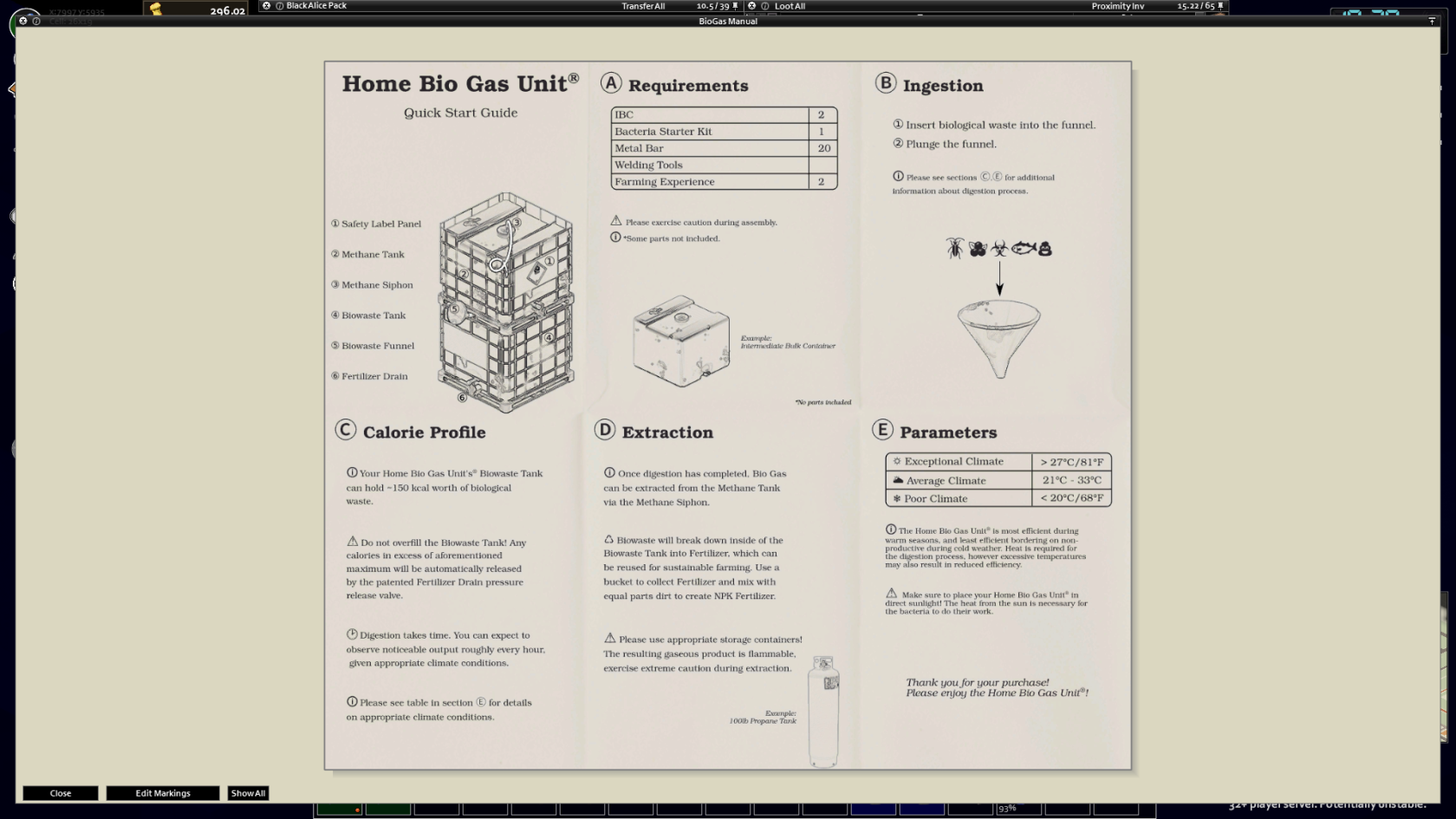
Gather foods with calories, the higher calorie filled a food is, the more propane and fertilizer is produced. Gather these foods my looting, fishing, trapping, foraging, or farming  
(I personally recommend fishing because you don't need to do much work other than the setup)

Fill the Home Biogas Unit with these foods and then plunge the funnel

After some time, the Home Biogas Unit will pump out units of propane and fertilizer. You can gather propane with a propane tank and the fertilizer with a bucket, which needs to be mixed with dirt to be usable

The hotter it is outside, the more efficient the Home Biogas Unit it is, and in the winter time, it's barely usable, so I advise only using it in the late Spring and Summer times for best production

# Global Item Shop

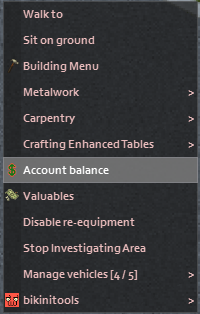
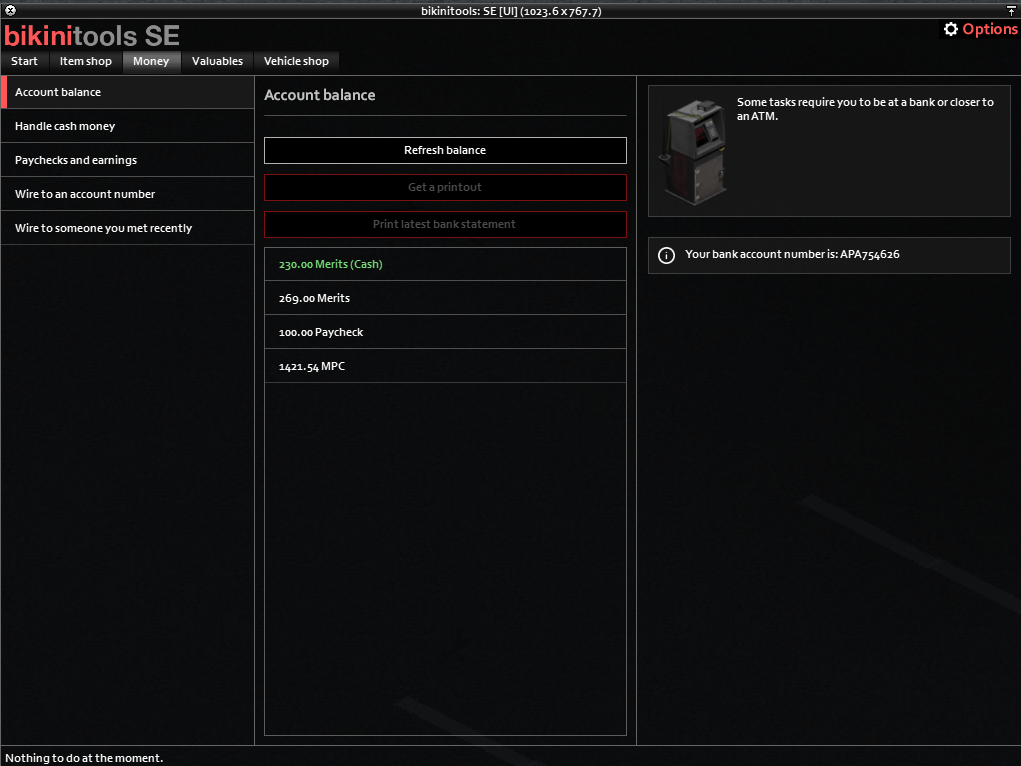
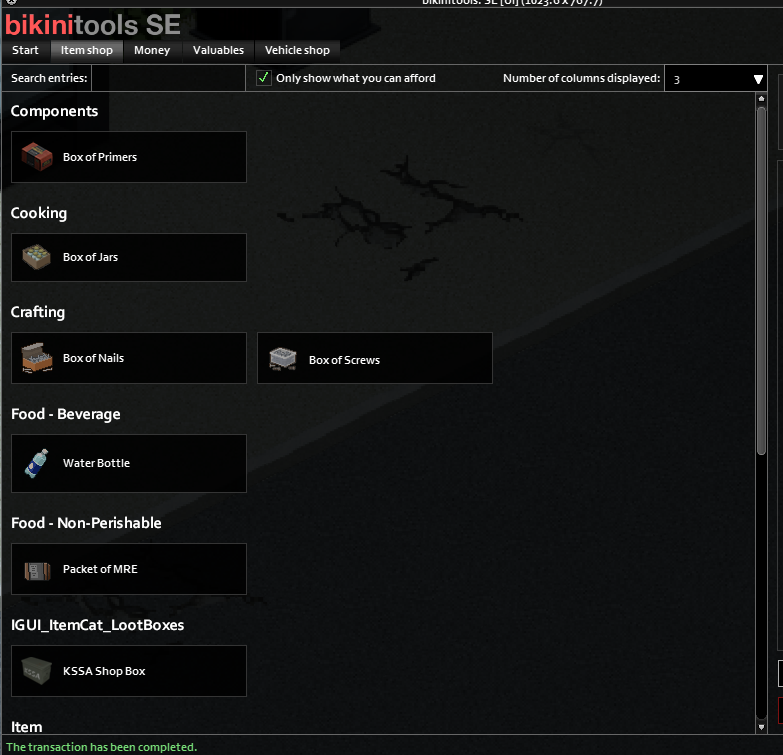
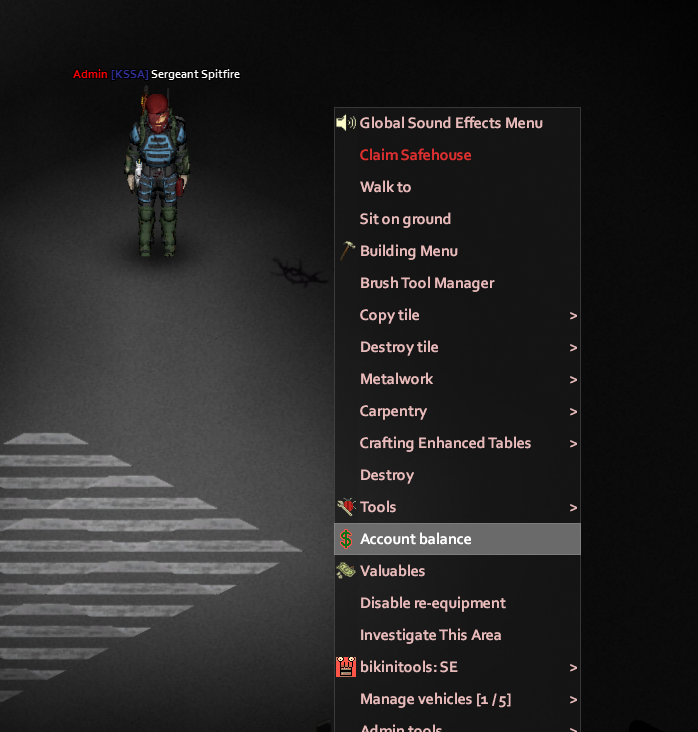
The KSSA runs a Global Item Shop. These items can be purchased from any ATMs that have the Global Item Shop activated.

The ATM at Sanctuary School is always set to have the Global Item Shop activated.

1

[![image.png](https://wiki.apathabove.com/uploads/images/gallery/2025-02/scaled-1680-/Px7image.png)](https://wiki.apathabove.com/uploads/images/gallery/2025-02/Px7image.png)
2

[![image.png](https://wiki.apathabove.com/uploads/images/gallery/2025-02/scaled-1680-/XqDimage.png)](https://wiki.apathabove.com/uploads/images/gallery/2025-02/XqDimage.png)
3

[![image.png](https://wiki.apathabove.com/uploads/images/gallery/2025-02/scaled-1680-/uJ6image.png)](https://wiki.apathabove.com/uploads/images/gallery/2025-02/uJ6image.png)
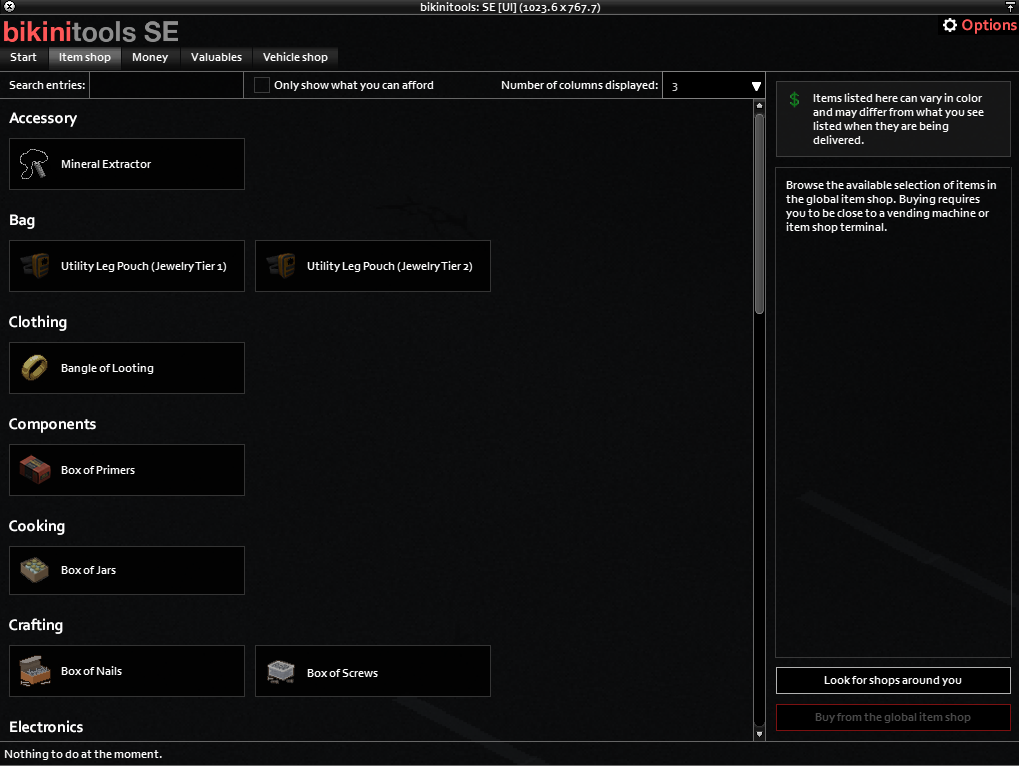
4

[![image.png](https://wiki.apathabove.com/uploads/images/gallery/2025-02/scaled-1680-/Wr6image.png)](https://wiki.apathabove.com/uploads/images/gallery/2025-02/Wr6image.png)
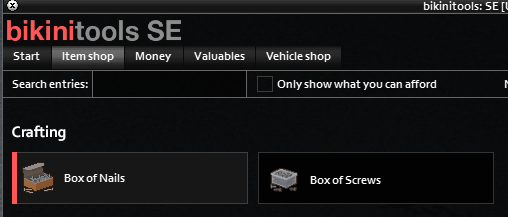
5

[![image.png](https://wiki.apathabove.com/uploads/images/gallery/2025-02/scaled-1680-/XBFimage.png)](https://wiki.apathabove.com/uploads/images/gallery/2025-02/XBFimage.png)
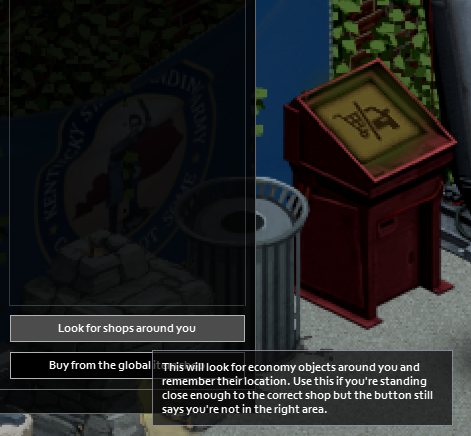
6

[![image.png](https://wiki.apathabove.com/uploads/images/gallery/2025-02/scaled-1680-/PfUimage.png)](https://wiki.apathabove.com/uploads/images/gallery/2025-02/PfUimage.png)
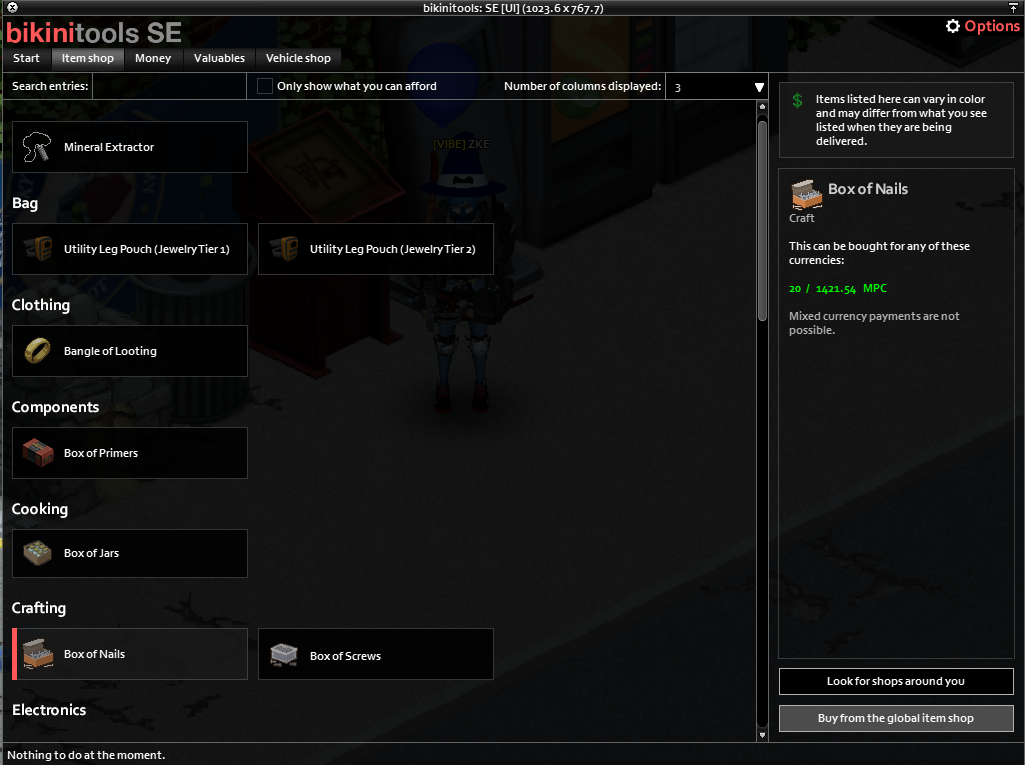
7

[![image.png](https://wiki.apathabove.com/uploads/images/gallery/2025-02/scaled-1680-/KvSimage.png)](https://wiki.apathabove.com/uploads/images/gallery/2025-02/KvSimage.png)
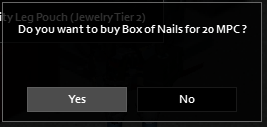
8

[![image.png](https://wiki.apathabove.com/uploads/images/gallery/2025-02/scaled-1680-/UN8image.png)](https://wiki.apathabove.com/uploads/images/gallery/2025-02/UN8image.png)
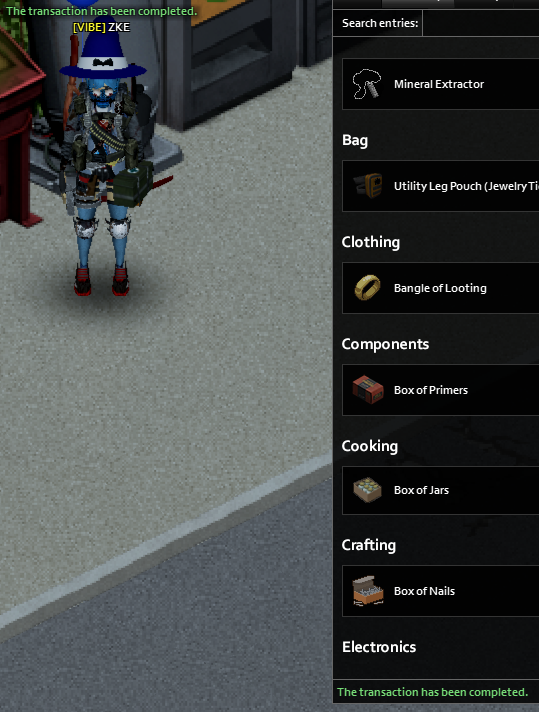
9

[![image.png](https://wiki.apathabove.com/uploads/images/gallery/2025-02/scaled-1680-/A16image.png)](https://wiki.apathabove.com/uploads/images/gallery/2025-02/A16image.png)
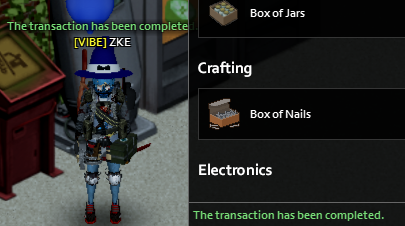
10

[![image.png](https://wiki.apathabove.com/uploads/images/gallery/2025-02/scaled-1680-/yCDimage.png)](https://wiki.apathabove.com/uploads/images/gallery/2025-02/yCDimage.png)
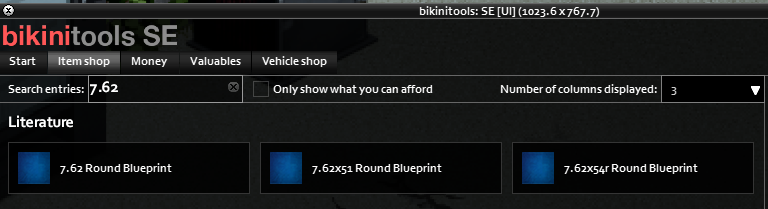
11

[![image.png](https://wiki.apathabove.com/uploads/images/gallery/2025-02/scaled-1680-/izSimage.png)](https://wiki.apathabove.com/uploads/images/gallery/2025-02/izSimage.png)
12

[![image.png](https://wiki.apathabove.com/uploads/images/gallery/2025-02/scaled-1680-/Q9Yimage.png)](https://wiki.apathabove.com/uploads/images/gallery/2025-02/Q9Yimage.png)
# A.R.M.S.

##### The KSSA is proud to present the <span style="text-decoration: underline;">Adaptive Retrofit &amp; Modification System</span> (ARMS). Using materials recovered from various industrial ruins, our engineers have found a way to modify any item that could be potentially used as weapon. This guide will provide a detailed outline of just how to accomplish this.   


### Proficiency By Weapon Category Overview  


Each of you have been given a Field Operator Proficiency System (FOPS). This system will bind weapons to the user and track proficiency with each weapon type. As you kill zeds with your weapons, you'll slowly gain proficiency in that weapon's category. FOPS interfaces with the KSSA Zed Zone ID (ZZ-ID), <span style="text-decoration: underline;">rewarding a higher proficiency for zeds killed in more dangerous areas</span>. Another advantage of FOPS is proficiency is stored on unique keyed identification system tracking proficiency even through death. Meaning <span style="text-decoration: underline;">you will not lose any proficiency on death</span>.

<p class="callout warning">Only the bound user can upgrade a weapon. Anyone can use it. </p>

<p class="callout info">Note: Types of weapons are defined as such: Long Blunt, Short Blunt, Axe, Long Blade, Short Blade, Spear, Rifle, Pistol, and Shotgun.</p>

##### Proficiency

A measure of how proficient you are with any type of weapon.

<p class="callout info">Note: Proficiency gained is directly measured by the amount of hits it takes to kill a zed. </p>

##### Proficiency Level  


Levels gained after reaching various proficiency cut offs. These vary per weapon type. Each level unlocks the ability to fill the next available slot in a weapon.

<p class="callout info">Max Proficiency drops the proficiency requirement on modifications.</p>

<p class="callout info">Example: You have a Fire Axe with 3 total slots and no current modifications. At Level 1 Proficiency for Axes you can add one modification. At Level 2 Proficiency you can add the second modification, and so forth. </p>

### Modification Overview

#### Bound Weapons

FOPS. binds weapons once used. Once bound, you will be able to interact with ARMS by equipping the weapon and interfacing with the armory table. <span style="text-decoration: underline;">Only those the weapon is bound to can modify it, however, anyone can use it. </span>

#### Materials

<span style="text-decoration: underline;">Materials can be found in industrial locations.</span> Our engineers are hard at work refining a processes of converting everyday materials into these base elements in the hopes of making this available to everyone. For now, we'll just have to scavenge them.

<p class="callout info">Note: Materials include: Cobalt, Carbon Steel, Tungsten, Titanium, Zinc, Diamond.</p>

#### Modifications

Each material has one more more modifications associated with it.

- Cobalt 
    - Impact Booster 
        - Increases min damage
    - Overstrike Amplifier 
        - Increases critical strike damage
- Carbon Steel 
    - Reinforced Structure 
        - Increases total condition
    - Extended Barrel 
        - Increases firearm range
- Tungsten 
    - Vital Targeting Module 
        - Increases critical strike chance
    - Force Multiplier 
        - Increases max damage
- Titanium 
    - Stamina Regulator 
        - Reduced endurance usage
    - Resilience Coating 
        - Decreases condition lower chance
- Zinc 
    - Advanced Targeting Matrix 
        - Increases firearm hit chance
    - Hardened Projectiles 
        - Increases firearm projectile pierce
- Diamond 
    - Adaptive Mod Framework. 
        - Increases total slot count
    - Mastering

<p class="callout info">Note: Some modifications may only be available to ranged or melee weapons only.</p>

<p class="callout info">The amount of bonus to a stat is determined randomly. </p>

#### Slots

FOPS and ARMS work together with the ZZ-ID System to assign a modification slot count to each weapon. The system isn't perfect, so counts may fluctuate. <span style="text-decoration: underline;">You can assure that items scavenged in more dangerous areas can get a higher starting slot count.</span>

<p class="callout info">Note: Total slot count can only be increased by 1 for each mastery of a weapon.</p>

### Adding Mods  


At the armory table, we can modify our weapons assuming we have the required proficiency level for the next available slot. Interfacing with the table, you can select the add mod option, available mod lists will be generated based on any materials you have in your rucksack. Simply choose one and it'll be added to the weapon.

<p class="callout warning">Stat modifiers are chosen at random.</p>

<p class="callout danger">There is no confirmation. Once a modifier is chosen it is applied.</p>

<p class="callout danger">The armory table is fragile, attempting to move it once constructed will disable it, and it can no longer be used with the ARMS system.</p>

### Removing Mods

Removing mods does exactly that, it removes a mod. Our engineers were unable to develop a way to recover the material when removing the mod.

<p class="callout danger">There is no confirmation. Once a modifier is chosen it is removed.  
</p>

### Diamond Ingots

Our engineers were able to do something extra special with diamond and it's unique properties.

##### Adaptive Mod Framework

Increases the total slot count on any weapon by one.

##### Mastering a Weapon

Once all slots are filled and an adaptive mod framework has been used on a weapon you can master it. This will re-set all base stats to the **current** **stats** and clear all mods and the mod framework counter. Choose wisely when to do this, as it'll also clear the repair counter.

# KSSA FOF Radio

The KSSA has successfully bartered with St Memphis to offer a chopper service to travel around the LVQZ quickly and effectively. This service doesn't come cheap sadly. You can pick up a FOF Military Radio and Smoke Grenades now from the KSSA Store for merits. These will allow you to call in for pickup by a St Memphis Helicopter.

#### KSSA FOF Radio

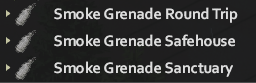
Simply access the radio in your pocket or on your belt, and choose from one of the available options under "Radio for Chopper". Options become available when you have Transit Smoke Grenade in your pocket. The chopper will take 15-30 seconds to arrive and pick you up.

[![image.png](https://wiki.apathabove.com/uploads/images/gallery/2025-03/scaled-1680-/MVyimage.png)](https://wiki.apathabove.com/uploads/images/gallery/2025-03/MVyimage.png)

[![image.png](https://wiki.apathabove.com/uploads/images/gallery/2025-03/scaled-1680-/image.png)](https://wiki.apathabove.com/uploads/images/gallery/2025-03/image.png)
<p class="callout warning">Do not "place smoke bomb" it does nothing except the vanilla smoke function. The KSSA is not responsible for misuse of equipment.</p>

<p class="callout danger">Leaving the immediate area near the LZ for the chopper once calling it could cause you to miss it completely.</p>

#### Chopper Destinations

##### Safehouse

This type will have a chopper pick you up from your location and drop you in the safehouse you have marked for respawn.

##### Sanctuary

This type will have a chopper pick you up from your location and drop you in the Sanctuary bus station.

##### Round Trip

This type will have a chopper pick you up and take you back to your safehouse. Once there you have around 5 minutes where the chopper will stay near by, once you're ready run outside and use the new option to "Head Back" and it'll pick you up again and drop you roughly where it picked you up originally. If you run out of time to use the "Head Back" option the chopper will RTB and you won't be able to travel back.

# APA Login Mod

You can download [the mod here](https://steamcommunity.com/sharedfiles/filedetails/?id=3607961215)

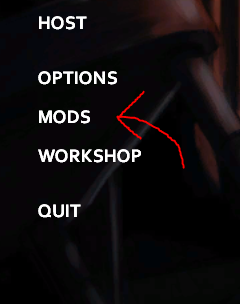
First open the game and then click mods on the main menu!

[![image.png](https://wiki.apathabove.com/uploads/images/gallery/2025-12/scaled-1680-/image.png)](https://wiki.apathabove.com/uploads/images/gallery/2025-12/image.png)
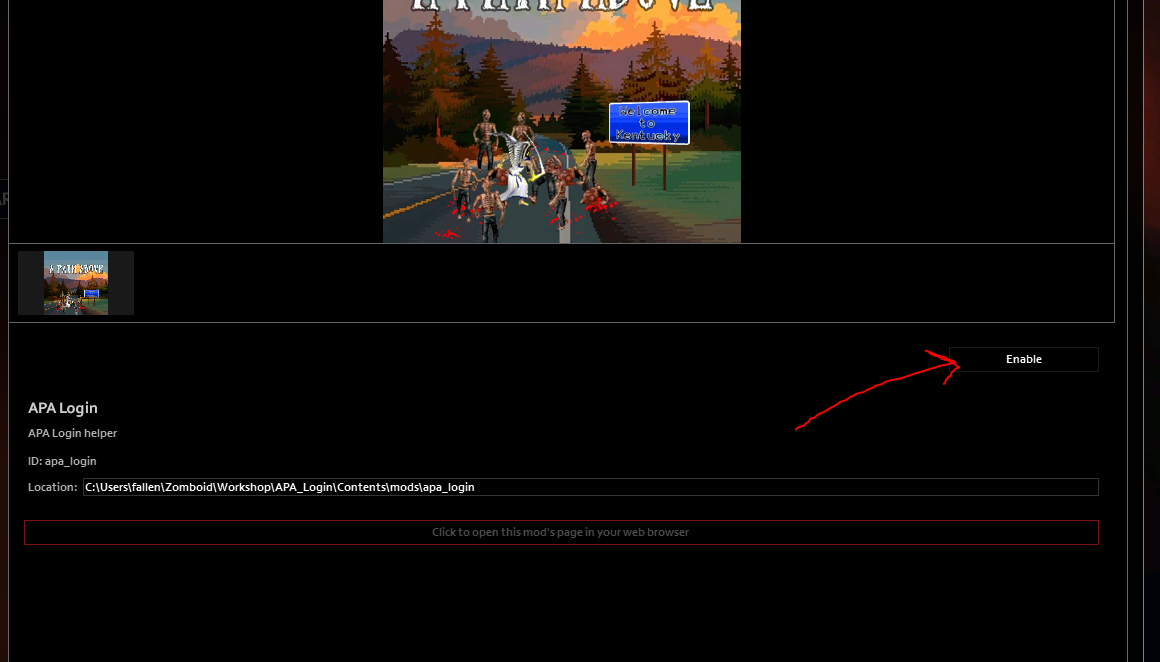
Click ok on the pop up and then scroll down till you find <span style="background-color: rgb(251, 238, 184); color: rgb(0, 0, 0);">APA Login</span> then click Enable.

[![image.png](https://wiki.apathabove.com/uploads/images/gallery/2025-12/scaled-1680-/fWAimage.png)](https://wiki.apathabove.com/uploads/images/gallery/2025-12/fWAimage.png)

Once enabled, click back, the game will load, and then you should see the new option to Join APA!

[![image.png](https://wiki.apathabove.com/uploads/images/gallery/2025-12/scaled-1680-/qcnimage.png)](https://wiki.apathabove.com/uploads/images/gallery/2025-12/qcnimage.png)
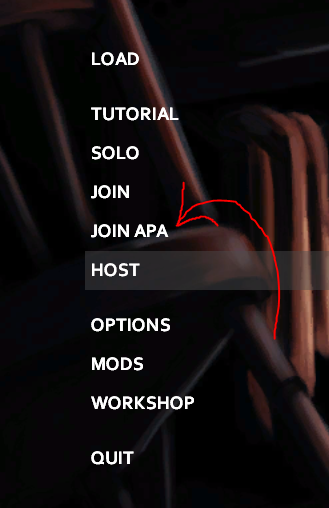
Once you click Join APA you'll be presented with a login screen, don't touch the Server Password.

[![image.png](https://wiki.apathabove.com/uploads/images/gallery/2025-12/scaled-1680-/IdDimage.png)](https://wiki.apathabove.com/uploads/images/gallery/2025-12/IdDimage.png)
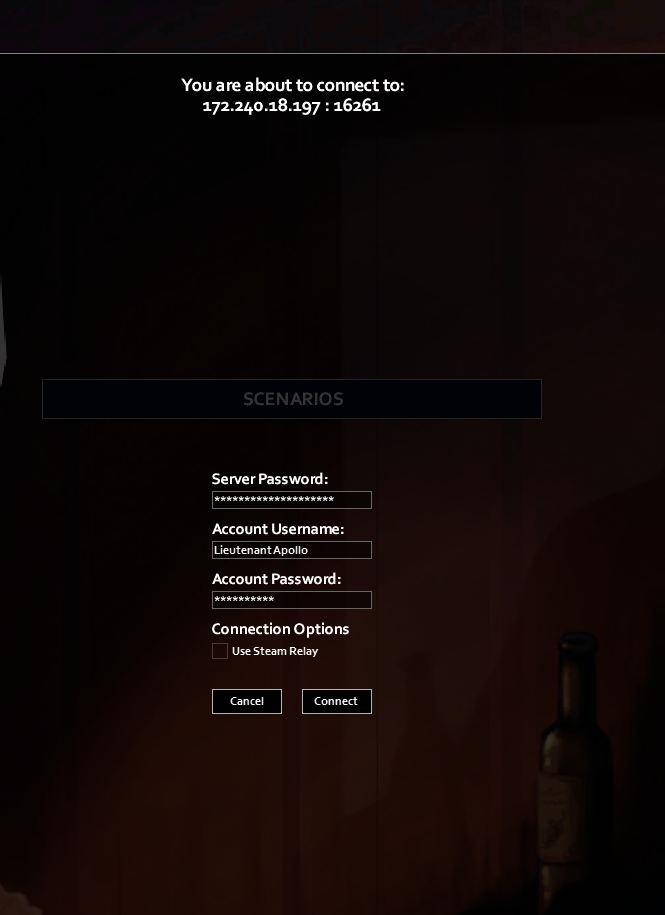
Enter the username you whitelisted with and then create any password you want, we ***DO NOT*** track this password.